DailyRidge.com · Local News · Community Stories · Advertising Opportunities
Fast · Factual · Free

DailyRidge Ad Placement Guide
Website ad locations for desktop and mobile experiences.
Desktop Ad Placements
Website ad locations for the desktop experience.
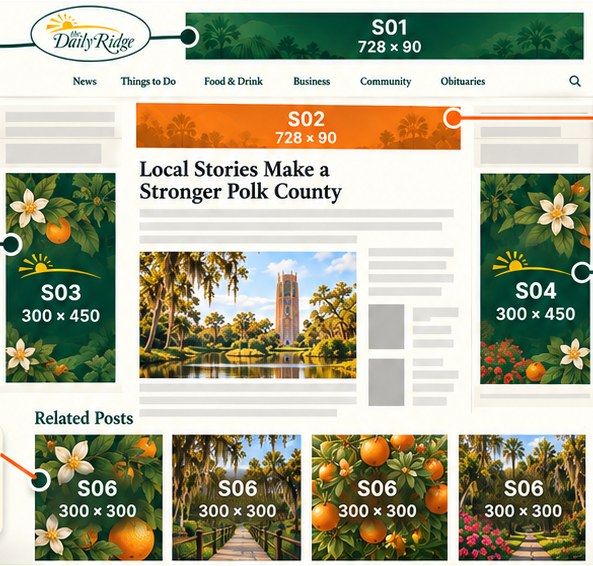
S01
S03
S06
S02
S04
Mobile Ad Placements
Website ad locations for the mobile experience.
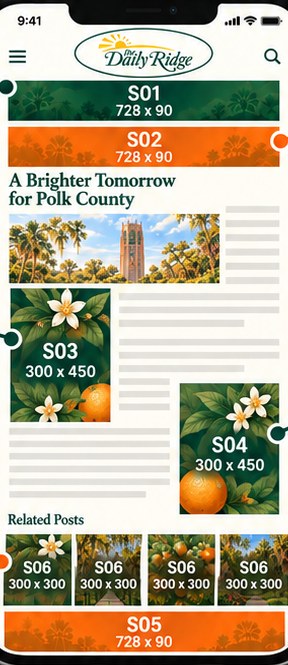
S01
S03
S06
S02
S04
S05
Placement notes
- S01 — Top BannerROS only. Broad sitewide inventory.
- S02 — Article TopCity or category targeted. Runs only when the article matches.
- S03 — Left Banner / Mid-ArticleCity/category with ROS fallback. Beside the story on desktop, inside it on mobile.
- S04 — Right Banner / Article BottomCity/category with ROS fallback. Beside the story on desktop, after it on mobile.
- S05 — Mobile Sticky FooterSpecial mobile placement. Stays visible at the bottom of the screen.
- S06 — Related Posts GridCity/category with ROS fallback. Four 300 × 300 units below related posts.
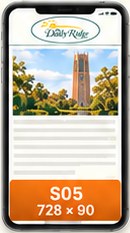
S05 Mobile Sticky Footer
Special mobile placement
728 × 90
Mobile only
S05 does not appear on desktop. It’s a mobile-only placement that stays visible at the bottom of the screen on mobile devices.
Supported categories
- Auto
- Business & Economy
- Health
- Entertainment
- Politics
- Crime
City targeting is also available for communities across Polk County.
Printable guides to share with your team or agency: